

📌 What is a BadUSB?
A BadUSB is a malicious USB device that exploits a fundamental flaw in how computers recognize USB peripherals. Unlike traditional USB viruses that rely on a malicious file, BadUSB operates by modifying the firmware of the USB device itself. It can then masquerade as a keyboard, mouse, network adapter, or even a legitimate storage device. This type of material is available to everyone for a small fee. BadUSB can be purchased on marketplaces like Amazon.
📌 How Does a BadUSB Work?
A BadUSB operates by leveraging a reprogrammable microcontroller to execute malicious commands as soon as it is connected to a computer. Here are the typical steps of an attack:
- Insertion of the BadUSB: The attacker inserts a modified USB device into the target machine.
- Detection and Identification: The computer recognizes the device but cannot determine if it is malicious or not.
- Execution of Malicious Commands: The BadUSB poses as a keyboard and executes commands by simulating a rapid sequence of keystrokes.
- System Takeover: It can download and execute malicious files, create backdoors, or steal sensitive data.
Real-World Examples of BadUSB Attacks
- Corporate Exploitation: An attacker leaves a BadUSB in an office. A curious employee plugs it in, triggering an automatic attack that compromises the internal network.
- Use of Booby-Trapped USB Keys: A USB key is abandoned in a parking lot or cafeteria. A victim plugs it in and gets infected without even opening a file.
📌 How to Protect Yourself from BadUSB?
Given this formidable threat, here are some best practices to guard against BadUSB attacks, while knowing that there are padlock systems to protect unused USB ports such as the one offered by the Lindy brand.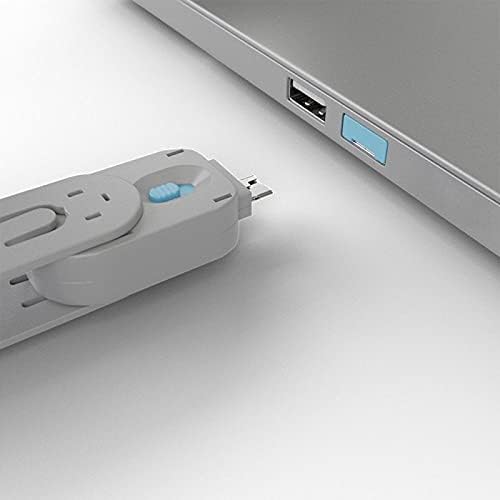
Never Plug in an Unknown USB Drive
If you find a USB drive or receive a USB device from an untrusted source, do not plug it in.
Disable Unknown USB Devices
Some cybersecurity solutions allow you to disable unauthorized USB devices or restrict their use to specific types of peripherals.
Use USB Security Tools
Software such as USBGuard (on Linux) helps control which USB devices are authorized on your machine.
Regularly Update Your System
Some security patches can reduce the risk of BadUSB attacks. Ensure that your operating system and software are up to date.
Use Trusted USB Ports
Whenever possible, use only the USB ports on your own equipment. In an internet café or public space, it is best to avoid shared USB ports.
Disable Automatic Script Execution
Some BadUSB attacks rely on the automatic execution of scripts. Disable this option to limit risks and disable autoplay. Windows Defender and other antivirus software like Avast or Bitdefender offer this feature.
📌 FAQ
📌 Conclusion
BadUSB devices represent a real and insidious threat that can cause significant damage in a very short time. By being aware of their existence and adopting good security practices, you can significantly reduce the risk of infection and protect your sensitive data. Stay vigilant, as cybercrime is constantly evolving, and every precautionary measure counts